Key takeaways Before you troubleshoot: what “not charging” really means Step 1: Rule out “normal low input” (weather, season, shading) Step 2: Check the controller status (bulk/absorption/float) Step 3: Confirm the battery isn’t already full (or limited by BMS) Step 4: Compare charge current vs load (net charging) Step 5: Inspect wiring, fuses/breakers, and connections Panel-side causes: how to test the panels themselves Common mistakes FAQ Next logical reads
Key takeaways
- “Not charging” is often low solar input (clouds, winter sun angle, new shading) rather than a failed component.
- Charge controllers may show little or no current when the battery is already near full (float/maintenance behavior).
- Many “charging problems” are actually net load problems: the system is producing power, but loads are consuming it.
Solar maintenance checklist Low solar output troubleshooting
Before you troubleshoot: what “not charging” really means
You’re the hero here: you want a system that’s predictable. The plan is to define the symptom precisely.
- No charging current on the controller display/app
- Battery percentage or voltage not increasing over time
- Loads shutting down due to low voltage even on sunny days
If possible, write down the time of day, weather, and what loads were on. That context often explains the result.

Step 1: Rule out “normal low input” (weather, season, shading)
Batteries charge when solar input exceeds loads. On cloudy days (or in winter), your panels may be producing far less than you’re used to.
- Compare to the same season, not summer peak output.
- Check for new shading (trees grow, sun path changes, snow cover).
- Confirm expectations using a quick estimate.
Expected daily Wh ≈ Panel watts × Peak sun hours × Efficiency
Solar panel output calculator Solar power basics
Step 2: Check the controller status (bulk/absorption/float)
Many controllers reduce current on purpose as the battery approaches full. That can look like “not charging” when it’s actually normal float behavior.
Look for the charging stage
- Bulk: high current (when available) while the battery is low
- Absorption: current tapers as voltage is held near the target
- Float: maintenance level once the battery is near full
MPPT vs PWM charge controllers MPPT not charging? (checklist)
Step 3: Confirm the battery isn’t already full (or limited by BMS)
A battery can “refuse charge” for reasons that are protective rather than broken.
- Battery already near full: the controller will reduce current.
- Cold-temperature limits: many lithium batteries restrict charging when cold.
- BMS protection: the battery may limit current or disconnect charging under certain conditions.
The safest approach is to use your battery manufacturer’s documentation and app (if available) rather than guessing.
Li-ion vs lead-acid batteries Battery capacity calculator
Step 4: Compare charge current vs load (net charging)
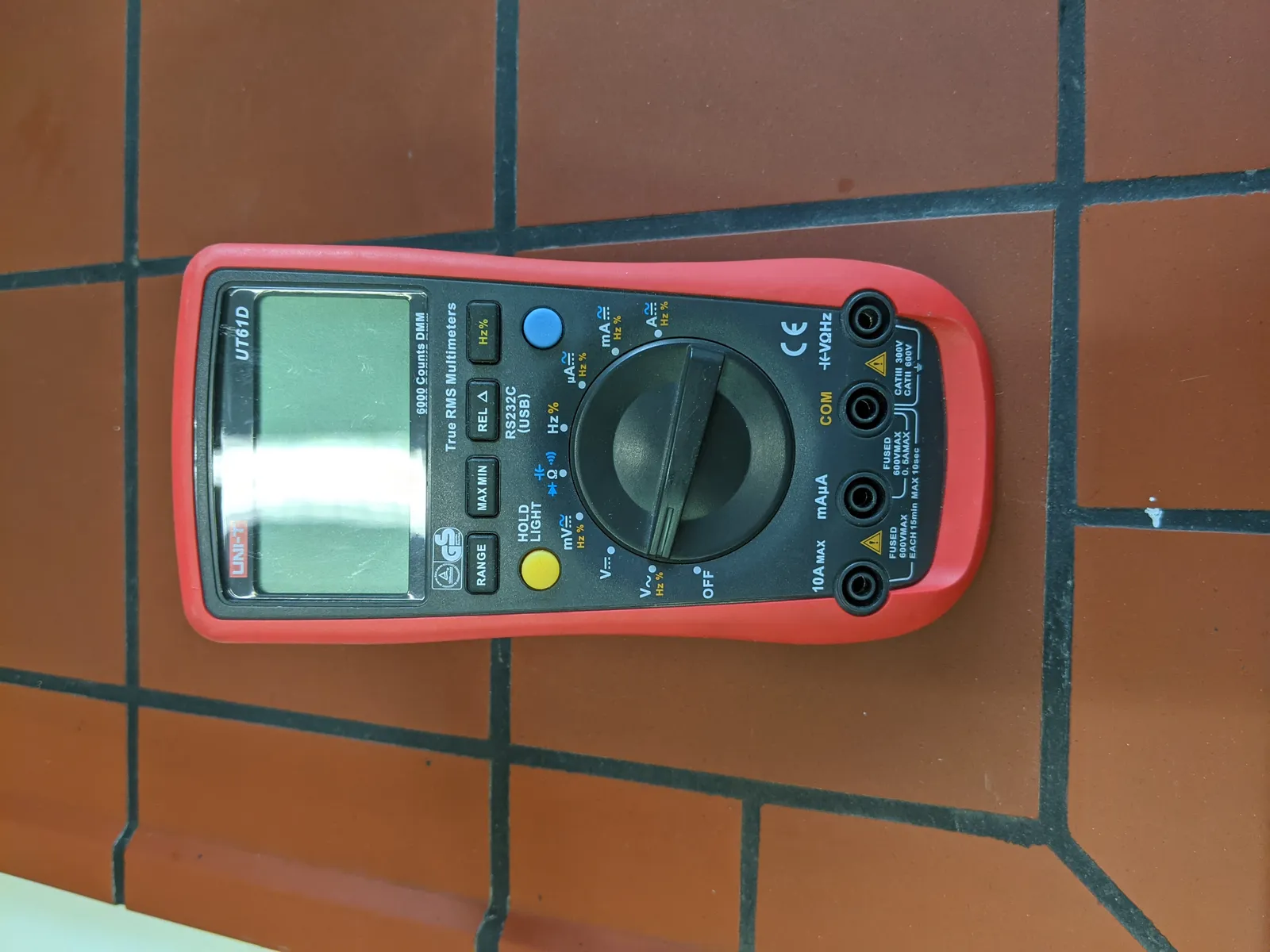
Steps 2 through 4 all come down to reading real volts and amps instead of guessing. This 600V CAT III meter covers 12V/24V bank checks and panel Voc on the one- or two-panel setups most readers are diagnosing (per manufacturer spec). Not for: long series strings above 600V Voc, or any energized AC service panel — that stays with a licensed electrician. The honest tradeoff: manual-ranging means you select the scale, and any working meter you already own does the same job — this one adds a drop-tested housing and clear continuity beeping for fuse checks.
Check price on Amazon (opens in a new tab) Price & availability shown on Amazon.com — we may earn a commission.If loads are high, the battery may not rise even with solar present. This shows up as “controller says charging, battery stays flat.”
- If possible, turn off non-critical loads briefly and see whether net charge changes.
- Check whether a new load was added (space heater, fridge mode change, pumps, battery charger).
- Verify inverter idle draw if you’re off-grid.
Inverter sizing (battery draw basics) Inverter keeps shutting off (troubleshooting)
Step 5: Inspect wiring, fuses/breakers, and connections
A loose connection can behave like a resistor: it limits current and creates heat. This is where you should be conservative: if you see discoloration, melted insulation, or hot terminals, stop.
- Look for obvious issues: loose lugs, corrosion, damaged insulation, tripped breakers.
- Verify DC ratings: protection devices should be DC-rated for your voltage.
- Check the “highest-current run”: battery-to-inverter cabling (if you have an inverter).
Solar wiring decisions (hub) Solar fuse and breaker sizing Battery cable size for inverters
Common mistakes (and what they look like)
- Assuming the controller is broken on cloudy days: low input is the most common “cause.”
- Ignoring charging stage: float/absorption taper can look like “no charge.”
- Chasing battery percentage only: look at trends over time with the same loads and conditions.
- Oversizing loads without resizing the system: net load overwhelms net charge.
- Reusing non-DC-rated protection hardware: creates real safety risk.
Panel-side causes: how to test the panels themselves
If the controller checks out but the battery still isn’t charging, the panels themselves are the next suspect — and a basic multimeter can tell you more in ten minutes than an hour of guessing. Two quick tests, done in full sun with the panels disconnected from the controller, separate a healthy panel from a dead one.
Safety first: do these tests with the panel leads disconnected (open-circuit), keep the meter leads away from each other, and never work with wet connectors. If you see melted insulation, browned connectors, or cracked glass, stop and replace rather than test.
Test 1: Open-circuit voltage (Voc) with a multimeter
Set your meter to DC volts, touch the leads to the panel’s positive and negative MC4 contacts (or the exposed leads), and read the number in full sun.
- A healthy 12V-nominal panel reads roughly 18–22V Voc (a typical 100W panel lands around 18–21V). These are rule-of-thumb ranges — check your panel’s label for its rated Voc and expect close to that number in good sun.
- A reading near 0V usually means a broken connection or a dead panel (see below).
- A reading well below label Voc (say 14–16V on a panel rated ~20V) suggests a damaged cell, a failed bypass diode, or corrosion in a connector.
Test 2: Short-circuit current (Isc) — with caution
Switch the meter to DC amps (use the 10A jack if yours has one), and briefly connect the leads across the panel’s positive and negative. Expect roughly 5–6A for a 100W panel in full sun.
- Only do this if your meter and its leads are rated for the current. A cheap meter on the wrong setting can blow its internal fuse — or worse.
- Keep the short brief (a second or two is enough to read it) and don’t do this on large arrays.
- A reading near 0A with healthy Voc points to a connection problem, not the cells.
What low or zero Voc actually means
- Cracked or damaged cells: output drops well below the label rating, sometimes unevenly across the panel.
- Failed bypass diode: the panel can read fine when part of it is shaded but drop sharply when the shaded section is bypassed — a quirk worth knowing before you condemn the whole panel.
- Corroded MC4 connectors: resistance builds at the connection, and voltage sags under any load. Unplug, inspect for green/white corrosion or water intrusion, and reseat or replace.
Hot spots and delamination: the visual check
Before you even grab the meter, look at the panel in full sun:
- Hot spots: a single cell or small patch noticeably hotter than the rest (carefully hover a hand a few inches above the surface — never touch). Often a sign of a cracked or shaded cell dumping heat.
- Delamination: bubbling, milky patches, or the plastic layer separating from the glass. This lets moisture in and degrades output over time.
- Snail trails, browning, or discoloration along cell lines often track with the hot spots above.
When it’s the wiring, not the panel
Panels get blamed for a lot of wiring problems. Before replacing anything:
- Blown inline fuse: many panel pairs have an inline fuse on the positive lead. If it’s blown, the panel reads fine at its leads but delivers nothing at the controller.
- Unseated MC4: a connector that looks plugged in but isn’t fully clicked home can read fine at the panel and read zero at the controller end.
- Wrong series/parallel combination: wiring panels in series adds their Voc together. Two 20V panels in series = 40V — if that exceeds your controller’s max input voltage, the controller will refuse the input entirely (some simply show 0W rather than error). Do the math before you rewire: total series Voc must stay below the controller’s rated max PV input voltage, with cold-weather headroom (Voc rises as temperature drops).
Worked example: 200W of panels, 19.2V at the leads, 0W at the controller
Here’s a real-world pattern worth memorizing:
- Setup: two 100W 12V-nominal panels wired in parallel, feeding an MPPT controller.
- Measurement at the panel leads: 19.2V Voc in full sun — right in the healthy 18–21V range for a 100W panel.
- Controller display: 0W input, no charge current.
- Diagnosis: the panels are fine. If both panels were dead, you wouldn’t see 19.2V at the combined leads. The problem is between the panels and the controller: a blown input fuse, an unseated MC4, or a corroded junction. Check the fuse first — it’s the cheapest and most common culprit.
The lesson: voltage at the panel leads proves the panel; power at the controller proves the path. You need both to call a panel good.
Quick reference: panel-side readings
| Measurement | Healthy reading | What a bad reading means |
|---|---|---|
| Voc (open-circuit voltage, full sun) | ~18–22V for a 12V-nominal panel (~18–21V for 100W) | Near 0V = broken connection or dead panel; well below label = cracked cell, failed bypass diode, or corroded MC4 |
| Isc (short-circuit current, meter-rated) | ~5–6A for a 100W panel | Near 0A with healthy Voc = connection/wiring fault, not the cells |
| Visual (hot spots, delamination) | Even surface temperature, no bubbling or milky patches | Localized heat = cracked/shaded cell; delamination = moisture ingress, degrading output |
| Voltage at controller input | Close to the panel-lead reading | Big drop or 0V = blown inline fuse, unseated MC4, or series Voc above the controller’s max input |
Solar panel output calculator Low solar output troubleshooting MPPT not charging? (checklist) Solar wire size guide
FAQ
Why is my solar battery not charging during the day?
How do I tell if my charge controller is working?
Can a full battery look like “not charging”?
Why does charging stop when it’s cold?
When should I call a professional?
Next logical reads
If your controller turns out to be the culprit: MPPT controller troubleshooting → · MPPT vs PWM (replacement logic) → · Battery monitoring guide → · Cold-weather charging limits →
Low solar output troubleshooting MPPT not charging? (checklist) Inverter keeps shutting off (troubleshooting) Solar maintenance checklist How to size a solar system Inverter keeps shutting off: causes If the battery is the failure: home batteries compared
Best MPPT charge controllers (2026 buyer guide) How to test a solar panel with a multimeter