Quick diagnostic flowchart: zero charge current? Start here Key takeaways How MPPT “finds” power (one concept) Step 1: Confirm PV input exists (sun/shade/soiling) {#step1} Step 2: Confirm PV voltage is high enough {#step2} Step 3: Validate array wiring and controller limits {#step3} Step 4: Check charging stage and settings {#step4}
Quick diagnostic flowchart: zero charge current? Start here
Work through these in order. Most “not charging” problems are found in the first three steps:
- Is the sun actually hitting the panels? → Check for shade, snow, heavy dirt. Most common cause in winter.
- Does the controller show PV voltage above battery voltage? → If not, check array wiring. Most common cause overall.
- Is the battery already full? → Controller in float mode is normal, not broken. Check battery voltage (see ranges below).
- Is it cold with a lithium battery? → BMS may be blocking charge. Most common cause below 32°F (0°C).
- Are there error codes on the controller? → Check the manual for overvoltage/overtemp/ground fault codes.
Expected voltages for a healthy system in good sun:
| Check | What you should see | Red flag |
|---|---|---|
| PV voltage (panels) | 5–20V above battery voltage | PV volts ≈ battery volts (wiring issue) |
| Battery voltage (resting, lead-acid) | 12.1–12.7V (12V system) | Below 12.0V (deeply discharged) |
| Battery voltage (resting, lithium) | 13.2–13.6V (12V system) | Below 13.0V or showing 0V (BMS tripped) |
| Battery voltage (charging) | 14.0–14.7V (lead-acid bulk) | Stuck below 13.5V in full sun |
| Charge current | Matches expected based on sun | 0A in good sun when battery isn’t full |
Quick diagnostic flowchart Key takeaways How MPPT finds power Step 1: Confirm PV input (sun/shade/soiling) Step 2: Confirm PV voltage is high enough Step 3: Validate array wiring & controller limits Step 4: Check charging stage & settings Step 5: Battery protections (BMS/temp/full) Seasonal patterns When to replace vs repair Common mistakes No output at all FAQ Next logical reads
## Key takeaways- MPPT needs enough PV voltage headroom above battery voltage to do its job — typically 5V+ on a 12V system.
- “Not charging” is often normal behavior (battery full/float) or low input (clouds/shade), not a broken controller.
- The fastest fix is usually a wiring/config check: series vs parallel and staying within controller limits.
- 90% of “my MPPT isn’t charging” cases are solved by steps 1–3 below.
MPPT vs PWM Solar battery not charging
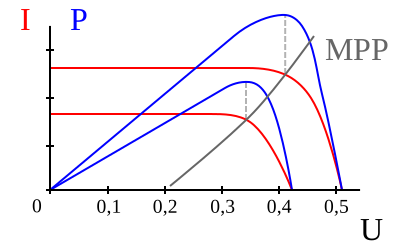
How MPPT “finds” power (one concept)
Solar panels have a “sweet spot” where voltage and current combine to produce the most power. MPPT controllers adjust how they draw power so the array operates near that maximum power point.
Practical implication: if PV voltage is too low (or input is tiny), there’s no useful point to track.

Step 1: Confirm PV input exists (sun/shade/soiling)
Start with the obvious because it’s usually correct. If you have a monitoring app, check PV watts across a few minutes.
- Weather and seasonality can reduce input dramatically.
- New shading (trees, vent shadows) can reduce output more than expected.
- Heavy soiling or snow cover can bring PV watts close to zero.
Most common cause: Snow cover on panels or a new shadow from tree growth / parked vehicles. A panel shaded by just 10% can lose 50–80% of its output.
What to check: Look at the controller’s PV watts display. On a clear day, a 400W array should show 250–380W at midday. If you’re seeing under 50W in full sun, the problem is input-side, not the controller.
Low solar output troubleshooting Solar panel cleaning cost
If Step 1 is as far as you can get without real numbers, Check price on Amazon (opens in a new tab) — the remaining steps below walk the full diagnosis with and without a meter.
Step 2: Confirm PV voltage is high enough
MPPT controllers typically need PV input voltage above battery voltage (plus internal overhead). If PV voltage collapses (wrong wiring or heavy shade), charging can stop.
- If your controller shows PV volts, verify it’s in a reasonable range for your array wiring.
- If PV volts are near battery volts in bright sun, suspect wiring configuration or a controller/input issue.
Most common cause: Panels wired in parallel on a 24V or 48V system, where the parallel PV voltage (≈17–22V for a single 12V panel) isn’t high enough above a 24V battery (≈28V charging) for the MPPT to work.
Voltage rule of thumb: Your PV voltage should be at least 5V above battery charging voltage for the MPPT to operate. For a 12V system charging at 14.4V, you need at least ~20V PV input. For a 24V system at 28.8V, you need ~34V+.
Quick test: Disconnect the PV array and measure open-circuit voltage (Voc) directly at the panel terminals with a multimeter. A single 12V panel should read 18–22V in sun. Two in series should read 36–44V. If you get near-zero, you have a wiring or panel problem, not a controller problem.
Series vs parallel solar panels Solar panel output calculator
Step 3: Validate array wiring and controller limits
Design inside the hard boundaries:
- Max PV voltage (especially in cold weather)
- Max PV current and/or maximum PV watts
- Battery bank voltage (12V/24V/48V)
If your system is near the limits, “it charged yesterday” doesn’t prove it’s safe today—temperature changes PV voltage.
Most common cause: Exceeded max PV voltage in cold weather. Panel Voc rises as temperature drops. A panel rated at 46V Voc at STC (25°C) can hit 55V+ at -10°C (14°F). If your controller’s max is 50V, it shuts down or gets damaged.
Check: Look up your panel’s temperature coefficient (usually -0.3%/°C). Calculate your worst-case cold Voc and compare to your controller’s max PV voltage rating. Leave 10% margin.
Solar components explained How to choose solar system voltage
Step 4: Check charging stage and settings
Controllers may intentionally limit current in absorption/float, or stop charging if settings don’t match the battery.
- Confirm battery type settings (lead-acid vs lithium profiles).
- Check for scheduled charge windows (some systems support this).
- Look for error states (overvoltage, overtemp, PV overvoltage, etc.).
Most common cause: Wrong battery profile selected. A lithium battery (LiFePO₄) set to a lead-acid charging profile may never reach full charge, or the controller may hold it at an incorrect float voltage. Lithium needs 14.2–14.6V bulk/absorb and 13.5–13.6V float; lead-acid needs 14.4–14.8V bulk and 13.5–13.8V float.
Check: Go into your controller settings and verify the battery type matches your actual battery. If you recently swapped from lead-acid to lithium, this is a very common miss.
Li-ion vs lead-acid (charging behavior differences)
Step 5: Battery protections (BMS, temperature, full battery)
Even with plenty of solar input, the battery may refuse charge under certain conditions.
- Battery full: controller sits in float with low current. This is normal — not a fault.
- Cold battery: many lithium packs block charging until warmed (typically below 32°F / 0°C).
- BMS events: battery may limit current or disconnect charging for protection.
Most common cause: Lithium BMS low-temp protection. Most LiFePO₄ batteries refuse to charge below freezing to prevent lithium plating. The controller shows PV voltage and sun, but charge current reads 0A. This is correct behavior — the battery is protecting itself.
How to confirm: Check if your battery has a low-temp sensor or Bluetooth app showing BMS status. If the battery is cold, you need to warm it (bring it inside, add a heating pad, or use a self-heating battery) before it will accept charge.
Solar battery not charging (full checklist) Solar maintenance checklist
Seasonal patterns: when “not charging” is normal
Many MPPT “not charging” reports follow predictable seasonal patterns. Knowing these saves you hours of troubleshooting:
| Season | Common pattern | Is it a problem? |
|---|---|---|
| Winter (Dec–Feb) | Low charge current, short charge window | Expected — shorter days + lower sun angle = 40–60% less production |
| Winter (cold climates) | Lithium battery shows 0A charge | BMS low-temp protection — warm the battery first |
| Winter (clear cold days) | Controller shows PV overvoltage error | Panel Voc spikes in cold weather — check controller voltage rating |
| Spring/Fall | Output varies wildly day to day | Normal — mixed sun and clouds |
| Summer | Controller in float by noon | Battery is full by midday — this is good, not bad |
| Summer (hot) | Lower than expected output | Heat derating — panels lose ~0.4%/°C above 25°C |
Key insight: If your system “stopped charging” in November and you live above 35° latitude, check your winter sun hours before assuming equipment failure. A system that produced 2,000 Wh/day in July may legitimately produce 600 Wh/day in December.
When to replace vs repair the controller
Before buying a replacement, confirm the controller is actually the problem. Most “broken controller” diagnoses are wrong — the issue is usually wiring, settings, or input.
Try repairing (free) first if:
- Controller display is blank → check fuse between battery and controller (often a 10–30A blade fuse)
- Shows error codes → look up the code in the manual; many are recoverable (overtemp clears when it cools, overvoltage clears when PV voltage drops)
- Settings seem wrong → factory reset and reconfigure battery profile
- Firmware is old → check manufacturer’s app for updates (Victron, Renogy, EPEver support this)
Replace the controller if:
- Physical damage: burn marks, melted terminals, bulging capacitors — stop using immediately
- Repeated PV overvoltage trips even after reconfiguring array → controller is underrated for your panels
- No display / completely dead after confirming input power is present and fuses are good
- Battery gets overcharged (boiling lead-acid, BMS tripping on lithium) → regulation circuitry has failed
- Controller is more than 7–10 years old → MPPT technology has improved significantly; a modern unit may harvest 15–25% more energy
Before replacing, note your system specs: battery voltage (12/24/48V), total panel watts, max PV Voc (cold), and max charge current. Match the new controller to these with 20% headroom.
See MPPT vs PWM to confirm you’re buying the right controller type for your setup.
For specific replacement models matched to array watts and battery voltage, see the best MPPT charge controllers guide. Three of the picks — the EPEver Tracer 4210AN review, the Victron 100/30 review, and the Victron 100/20 review — have standalone reviews with the worked sizing math.
Common mistakes
- Using parallel wiring by default: can keep PV voltage too low for MPPT to charge efficiently in some setups.
- Ignoring controller voltage limits: especially risky in cold weather when PV voltage rises.
- Assuming “zero amps” means broken: float mode or a full battery can legitimately show low current.
- Chasing settings before checking PV input: always confirm sun/shade and PV watts first.
No output at all? (0 W display, dead load terminals)
Answer-first: a controller that shows nothing at all and a controller that’s alive but stuck at 0 W are two different faults — and neither is automatically a dead controller. Work this decision tree top to bottom with a multimeter; each branch ends in either a fix or an honest “replace it” verdict.
| Symptom | First measurement | Most common cause |
|---|---|---|
| Display dead, no LEDs | DC volts at the PV input terminals | No power reaching the controller (panel / MC4 / inline fuse) |
| Display alive, 0 W in full sun | PV Voc, then battery voltage | Battery full (float) or wrong battery-type setting |
| Load terminals dead, charging fine | Battery voltage with loads off | Low-voltage disconnect (LVD) on a low battery |
| Burn smell / no comms after a cold snap or new wiring | PV Voc vs controller max rating | Blown input stage (reversed polarity or cold-weather Voc over limit) |
Branch 1: Display dead, no LEDs at all
The controller has no power, so it can’t charge or switch loads until that’s fixed.
- Set your multimeter to DC volts and measure directly at the controller’s PV input terminals (probes on PV+ and PV−, panels still connected).
- On a sunny day you should read close to the array’s open-circuit voltage (Voc): roughly 18–22V for a single 12V panel, roughly 36–44V for two in series.
- If you read ~0V at the terminals, the fault is upstream of the controller. Trace in this order: panel output → each MC4 pair → inline fuse or breaker.
Worked example: two 100W 12V panels in series, ~21V Voc each → expect ~42V at the controller in sun. If you measure ~21V at the first panel’s leads but ~0V at the controller, the series MC4 pair between them (or the inline fuse) is the culprit.
If PV voltage is present but the display is still dead: check the battery-side fuse next — most controllers power their electronics from the battery, not the PV input. A blank display with confirmed input power is listed in the replace-vs-repair section below as a replace candidate.
Branch 2: Display alive but 0 W in full sun
The controller has power but isn’t converting. Two measurements settle most cases:
- Measure PV Voc at the controller terminals. Well above battery voltage? Input is fine.
- Measure battery voltage at the battery terminals. A controller only charges when battery voltage is below its absorb/float setpoints — a full battery sitting in float legitimately shows 0 W. Check which charge stage the display reports (bulk / absorb / float) before calling it a fault.
- Verify the battery-type setting matches your actual bank (lead-acid vs lithium). A mismatched profile can hold the wrong target voltage or never trigger charging correctly — Step 4 above covers the settings in detail.
Rule of thumb: MPPT needs roughly 5V of PV headroom above battery charging voltage (see Step 2). If PV Voc is healthy, the battery is genuinely low, the setting is right, and it still shows 0 W in full sun — that combination points toward Branch 4.
Branch 3: Load terminals dead, charging works fine
If the display is alive and charging normally but the load terminals feed nothing, the controller may be protecting the battery, not failing.
- Many controllers’ load outputs shut off at a low-voltage disconnect (LVD) threshold when the battery gets too low. For 12V systems these cutoffs are typically around 10.5–11V (some units default near 11.1–11.5V; check your manual for the exact value).
- Measure battery voltage with all loads off (resting). If it’s at or below the LVD threshold, the dead load terminals are the protection working as designed.
- Recovery: charge the battery back up (sun or a shore/battery charger) and the load output should re-enable. If the battery is healthy but keeps sagging into LVD, your bank is undersized for the loads — see the solar battery not charging checklist for the battery-side diagnosis.
- Note: LVD only protects loads wired to the controller’s load terminals. An inverter wired straight to the battery bypasses it entirely.
Branch 4: Blown controller input (reversed polarity or cold-weather Voc over limit)
The failure mode that actually kills controllers. Two common triggers:
- Reversed polarity — PV+ and PV− swapped at the controller during install.
- Voc over the controller’s max PV input rating in cold weather. Panel Voc rises as temperature drops — roughly 10% below freezing as a planning margin. A 100V-max controller fed by a 90V Voc string at 25°C can exceed 100V on a cold morning, and the input stage takes the hit.
How to detect a blown input:
- Burn smell or visible scorching at the PV terminals — stop using the unit immediately.
- No comms / no display even with confirmed PV voltage and battery power at the terminals (Branch 1 checks done, still dead).
- Repeated PV-overvoltage error codes that persist after the array is reconfigured.
The honest replacement path: a blown input stage is not a DIY board repair for most people — replacement is the realistic option. Before buying, note your battery voltage, array watts, and worst-case cold Voc, then size the new controller’s max PV input with margin. Our best MPPT charge controllers guide matches controllers to array size and battery voltage. And to keep the next controller alive: size the PV-side fuse/breaker correctly — see solar fuse and breaker sizing.
When to stop and call a licensed electrician: if you smell burning, see scorched or melted terminals, measure voltage where you shouldn’t (grounded frames or conduits live), or find a battery that won’t hold charge after all these checks, stop working on it — that’s the point where a licensed electrician or qualified solar professional takes over. Panel voltages are high enough to injure, and a battery that stays hot or swollen is a fire risk, not a DIY project.
Step one of every MPPT troubleshooting checklist is measuring PV voltage — this 600V-rated meter covers 12V/24V system banks and single-panel Voc checks against spec-sheet numbers (per manufacturer spec). Not for: large series strings that can exceed 600V Voc, or probing inside a live breaker panel or any energized AC service — that stays with a licensed electrician. The honest tradeoff: it is manual-ranging, so you pick the scale, and any meter you already own may read battery voltage fine — this one adds a CAT III 600V safety rating and drop-tested build.
Check price on Amazon (opens in a new tab) Price & availability shown on Amazon.com — we may earn a commission.FAQ
Why is my MPPT controller showing PV voltage but zero charge current?
Does MPPT work with panels wired in parallel?
Can cold weather stop MPPT charging?
When should I call a professional?
Next logical reads
MPPT vs PWM Series vs parallel panels Low solar output troubleshooting Solar battery not charging How to size a solar system What size solar generator to run a refrigerator How long will a 100Ah battery run CPAP battery backup guide MPPT controllers matched to array size (spec table) Test a solar panel with a multimeter