Quick answer
A shunt-based battery monitor is the only honest way to know your bank’s state of charge on a live solar system — voltage readings can’t do it, especially with LiFePO4, whose voltage curve is nearly flat across the middle of its range. A shunt (a precision resistor in the battery’s negative line) measures every amp in and out and counts the balance; the monitor turns that into state of charge, amps, and time-to-go. The practical choice: a Bluetooth app-first unit (Victron SmartShunt class) for most builds, a display unit (BMV-712 class) if you want SOC readable on the wall without opening an app, or a budget shunt meter for a shed system where ~±5% is acceptable. The install rule that makes any of them accurate: everything — every load, every charge source — connects on the shunt’s far side, with only the shunt itself touching battery negative.
This page is spec math and manufacturer documentation; we test nothing. Prices stay on the retailer’s page, not ours.
Why voltage lies (especially with LiFePO4)
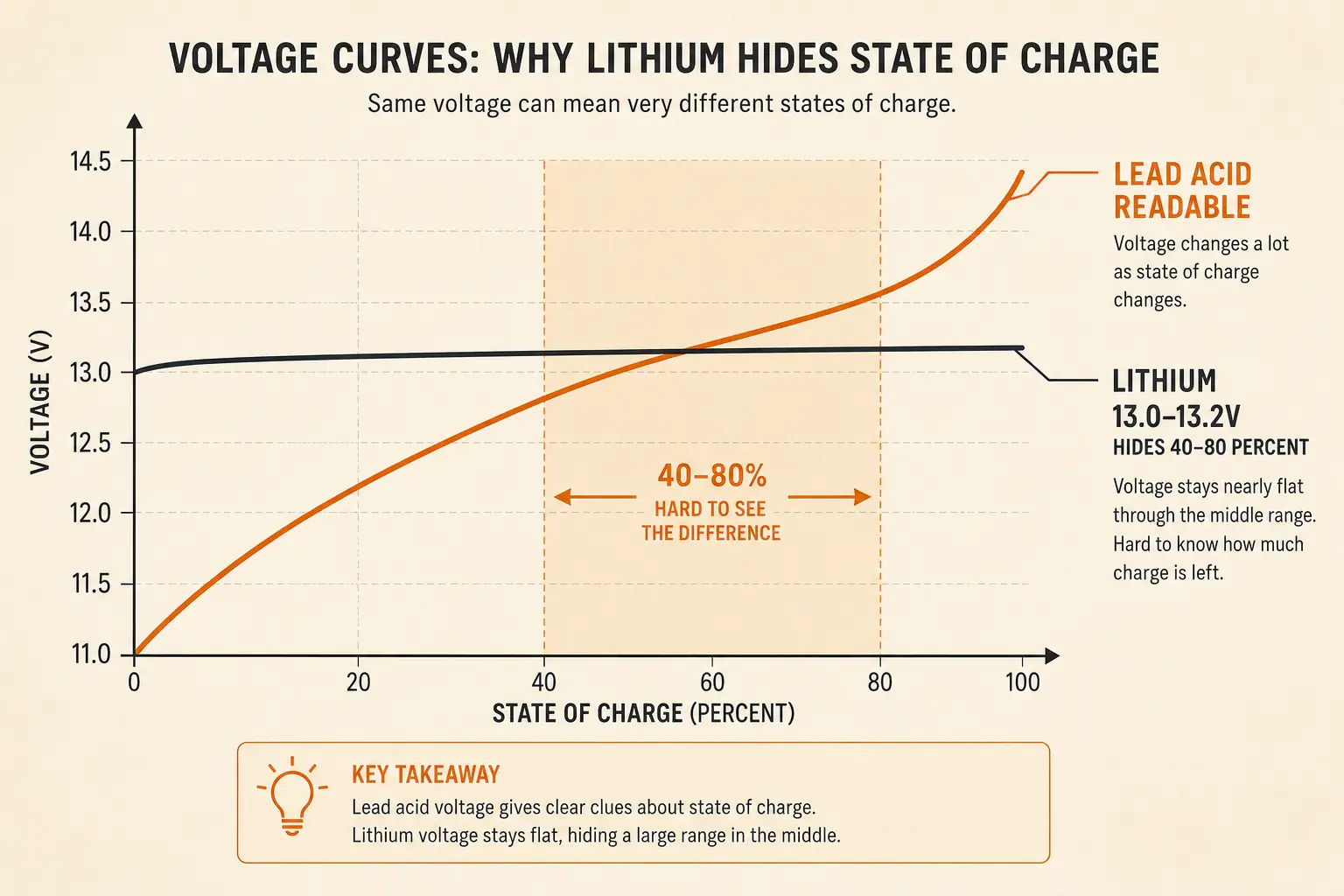
Reading state of charge from a battery’s voltage requires a resting battery — no charge, no load, for hours. On a live system that condition never happens, so voltage bounces with every cloud and fridge cycle:
- LiFePO4’s flat curve: roughly 13.2V to 13.0V covers a huge share of the usable range on a 12V lithium bank. A reading of 13.1V could be 40% or 80% — the chemistry simply doesn’t announce its level in volts the way lead-acid sort-of does (this is the flat discharge curve that also makes lithium’s delivered voltage so stable — the same property read from the other side).
- Under load, voltage sags; under charge, it rises. Both lie about the underlying charge.
- Temperature shifts resting voltage on top of everything else.
Lead-acid banks have the same problem with a steeper curve. The universal fix is the same: stop inferring, start counting.
How a shunt counts (and why it needs one honest sync)
A shunt is a resistor of precisely known value (the standard is 50mV drop at rated current — e.g., 500A/50mV). The monitor measures the tiny voltage across it, converts to amps via Ohm’s law, and integrates amps over time — coulomb counting. Three consequences worth knowing:
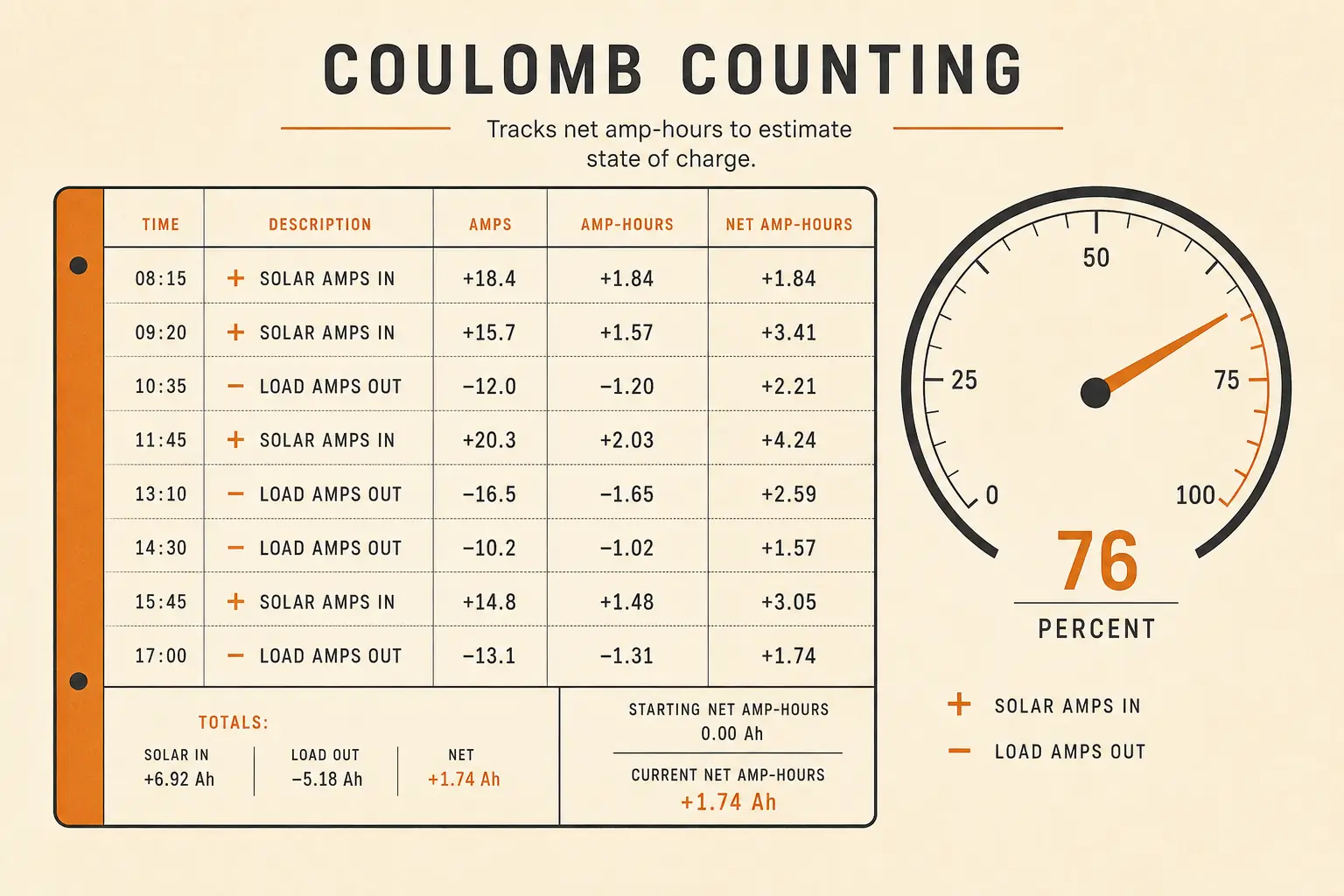
- It counts everything that crosses it. Loads, solar charge, alternator charge, the inverter — all of it becomes one honest ledger.
- It drifts without a reference. Counting has small errors (measurement noise, charge-efficiency assumptions), so the monitor resynchronizes its “full” zero-point whenever the bank reaches a confirmed full charge (charge current tapering to a threshold at absorption voltage — the standard sync condition). A system that never reaches full keeps drifting; that’s a usage fact to know, not a flaw.
- LiFePO4 makes counting mandatory. Because the voltage curve is flat, lithium banks are effectively unmonitorable by voltage; every serious lithium build uses a shunt. Lead-acid can be checked with a hydrometer (flooded) as a cross-check — lithium has no equivalent.
The units compared (verified against manufacturer pages, 2026-09-06)
| Spec | Victron BMV-712 Smart | Victron SmartShunt | Budget shunt meters (AiLi class) |
|---|---|---|---|
| Type | Display head + 500A/50mV shunt, Bluetooth built-in | Shunt-only, Bluetooth (app is the display); 300A–500A classes sold | Shunt + small LED display head |
| Readout | Wall display + VictronConnect app | VictronConnect app only | On-device display only |
| Mid-charge status | At a glance | Phone in hand | At a glance |
| Temp sensor | Optional accessory (BMV-712) | Not applicable/sold separately per listing — verify | Typically no |
| Extras | Relay for generator start-stop (per product documentation) | Same app ecosystem as Victron controllers | None |
| Warranty | 5-year standard (per victronenergy.com) | 5-year standard (per victronenergy.com) | Varies — check before buying |
| Typical street | Premium display class (~$150–$190 street, editorial band) | ~$100–$120 genuine street (authorized dealers; beware far-cheaper counterfeits — a documented marketplace problem) | ~$25–$40 (editorial band) |
BMV-712 shunt rating, Bluetooth, optional temperature sensor, and 5-year warranty per victronenergy.com product page, retrieved 2026-09-06; the overview page does not list supply range, draw, or accuracy — verify in the datasheet if those matter to your build. SmartShunt pricing per authorized-dealer listings retrieved 2026-09-06.
Choosing in one line: if you check charge status from the couch, get the SmartShunt class (app); if the system lives in a cabin you walk past, the display BMV-712 class; if it’s a shed battery and close-enough is fine, the budget class — with eyes open that a ±5% drift between syncs is normal at that tier (editorial judgment from the spec class, not a test claim).
The install rule that decides your accuracy
The shunt is the only thing connected to battery negative. Every load and every charge source lands on the shunt’s other side (the “load side” busbar). Wire anything directly to the battery minus post — a fuse block, an inverter case ground, a fridge — and the monitor never sees it, and your SOC quietly becomes fiction.
The rest of the install arithmetic:
- Cable size to the monitor is trivial (milliamp draw), but the main negative cable now routes through the shunt — size that cable for the full bank current per our battery cable guide, and fuse the positive side per fuse sizing.
- Placement: shunt close to the battery (clean, dry, away from the inverter’s heat); display or phone range as you like — the electronics don’t care.
- Settings you must enter: bank capacity (Ah), battery chemistry, charge efficiency (LiFePO4 ≈ 99%; flooded lead-acid ≈ 85–90% typical), and the charged/sync parameters (absorption voltage + tail current). Defaults are sane; wrong capacity entries are the #1 accuracy killer.
Worked example: what the numbers buy you
A 200Ah LiFePO4 bank (2 × 100Ah in parallel — the bank-building math scales), average overnight draw 5A from dusk to midnight and 3A after: 6h × 5A + 6h × 3A = 48Ah out. Morning SOC reads 76% (152Ah remaining) — not “13.0V, could be anything.” At the 8am solar ramp delivering 25A net, the monitor’s time-to-go says the bank returns to full in roughly 1.9 hours — you learn the recharge finished at 10am instead of guessing at noon. Multiply that visibility across every day of the system’s life and the monitor pays for itself in avoided guesswork and gentler depth-of-discharge management — the single biggest lifespan lever.
Frequently Asked Questions
Can I just use a voltmeter to check my battery?
What's the difference between the BMV-712 and the SmartShunt?
Do I need a monitor if my battery has Bluetooth built in?
Why does my monitor's state of charge drift over time?
Are cheap shunt meters any good?
Next logical reads
Battery management systems explained Battery capacity explained Battery maintenance guide Battery cable sizing LiTime 100Ah review (bank-building math)
Shunt-based coulomb counting with Bluetooth as the display — the same measurement as the BMV line without the wall head (per manufacturer product pages, retrieved 2026-09-06). Not for: builds that need SOC readable without a phone (the BMV-712 class) or shed systems where a budget shunt is honest enough. The honest tradeoff: buy from authorized dealers — genuine street runs ~$100–$120, and far-cheaper listings are a documented counterfeit risk.
Check price on Amazon (opens in a new tab) Price & availability shown on Amazon.com — we may earn a commission.